17 Fit For specialists
Personal supervision
Your client’s food diary, live — not once a month
Personal supervision is the 17 Fit feature that gives a dietitian, nutritionist, trainer or doctor live access to a client’s data — only the sections the client chooses to share. You follow their food diary and weight, comment and propose changes, and the client decides. The client needs Pro+ to invite you; supervising one client is free for the specialist.

How it works
Your client sends a key. You see what they share.
A client on Pro+ sends you a single-use key as a link, or shows you its QR code. The key works for 48 hours — accept it in 17 Fit.
- No sign-up No e‑mail, no phone number — just a name or nickname, and a photo if you like.
- Access period 30 days, 3 or 6 months, a year or no end date — the client decides.
Levels of trust
Observes, advises or leads
The client picks a level for each specialist and can change it any time.
- Observes Sees the chosen sections live — no comments, no changes. The default when the client invites a doctor.
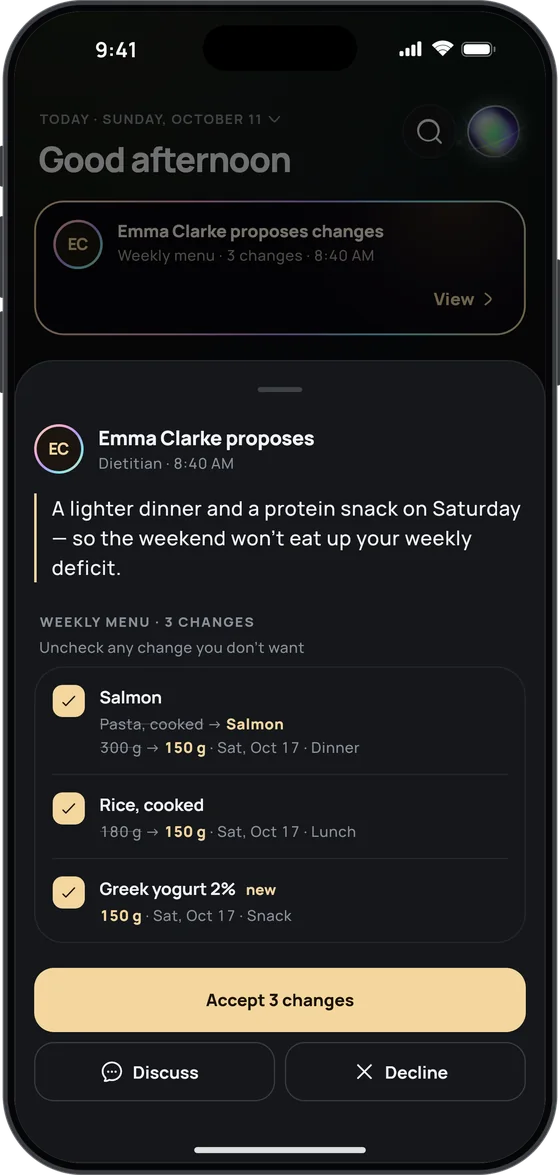
- Advises Comments and proposes changes; the client accepts all or some, declines or discusses them.
- Leads Changes the menu, supplements, targets, water and fasting without asking first; the client sees each change and can revert it.
Sections
Diary, weight, menu — only what’s shared
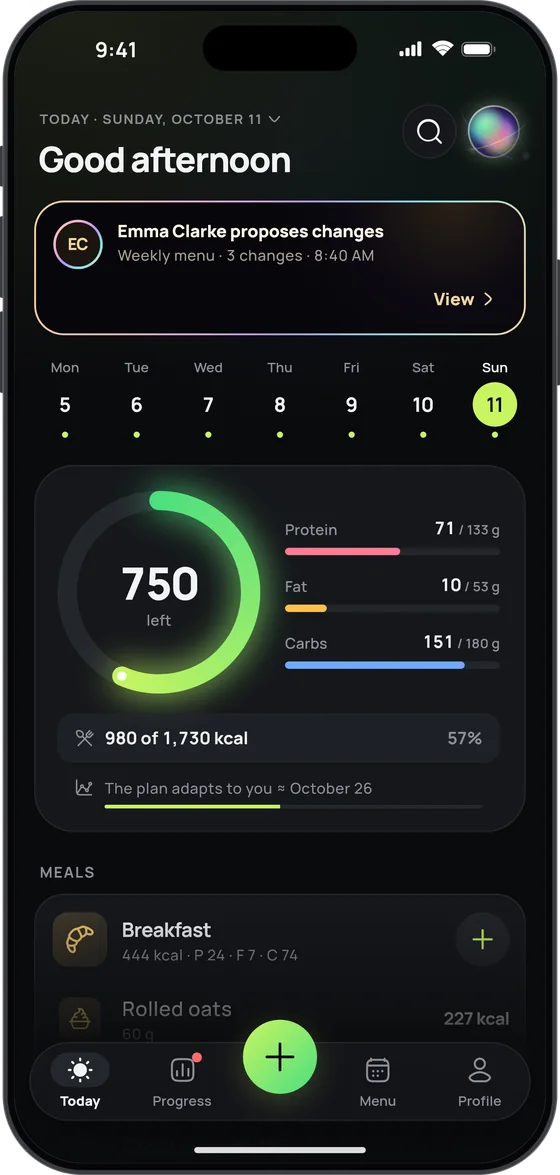
The client turns sections on for each specialist separately. The diary, weight and dossier are view-only; everything else changes only through proposals, which the client sees on their Today screen.
- Food diary Every meal with its calories, the day’s macros against the target. Comment on a day, a meal or a single entry.
- Weight & measurements Weigh-ins, measurements and the change over 7 days.
- Menu & targets Dishes for the week ahead, supplements and doses, calorie and macro targets, water and fasting — each change shown as before → after.
- AI coach dossier Goals, restrictions, routine and tastes the Ultimate coach has gathered. Off by default in every invitation.
Specialist tools
Overview, templates and AI drafts
No separate dashboard: clients, conversations and proposals live in your own 17 Fit app, under My team.
- Worth a look The overview flags days without entries, low protein, days over the calorie target and weight changes.
- My templates Save a menu, supplements or targets once, then propose them to any client in one tap.
- AI draft At Advises or Leads, AI drafts a menu or supplements from what you can see of the client: targets, restrictions, habits. Nothing reaches the client unless you send it.
Privacy
The client holds the keys
Only the client’s phone can change their data, and only with changes they accept — or allow in advance by choosing Leads. They can pause or end access at any time.
- Photos aren’t shared A specialist never sees body or meal photos, at any level.
- Access journal The client sees when you view their data, and every change.
- Separate from your own Client data is never saved on your phone or mixed with your own.
Plans
What it takes
Inviting takes Pro+ on the client’s side. Any 17 Fit user can be the specialist.
- For the client Up to three specialists at once — say, a dietitian, a trainer and a doctor.
- For the specialist One client on any plan, including the free Basic; up to five with Pro+.
- If a specialist’s Pro+ ends The longest-standing client stays. The rest are paused, not removed, and come back on renewal.
Does a dietitian need a 17 Fit subscription to supervise clients?
No. A specialist can supervise one client on any plan, including the free Basic, and up to five with Pro+. It’s the client who needs Pro+ to invite you.
Can my client see my templates and AI drafts?
No. They see your name and photo, your messages and the proposals you send; their access journal shows when you viewed their data.
What happens to supervision when my client’s Pro+ ends?
Access pauses and nothing is deleted. When they renew, it comes back by itself.
Does 17 Fit notify me when a client logs a meal?
No push notifications. While 17 Fit is open, messages and proposals refresh at least once a minute, and a client’s new entries show up as soon as their phone syncs.
Does 17 Fit have a web dashboard for dietitians?
No. There’s no web version or desktop dashboard: Personal supervision works inside the 17 Fit app, the same calorie counter your client uses.

Supervise clients where they already count calories
All a specialist needs is 17 Fit and the key. A client on Pro+ creates one in Profile, under My team.